

Prompt Studio 0.36
 AF
AFA tool should be able to work with the folder you already have. Prompt Studio 0.36 makes that the starting point: open one folder as a project, then choose a workspace when the work needs a different environment. Git is optional.
The same release lets Planner tickets share existing workspaces and sessions. It also repairs conversation history and makes tool views refresh without needlessly losing what you were reading.
Start with a folder, not a repository
Opening a project now means selecting its folder. You do not need to register a repository or choose an agent before the project opens. You can start with a directory of notes, a collection of scripts, or a codebase. A Git repository is useful when you want a worktree; it is not required just to use the workbench.
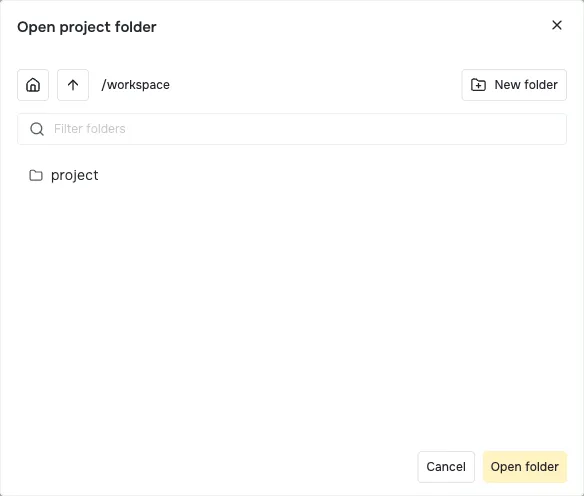
Captured in 0.39 with a sample folder. Folder-based projects and the redesigned folder dialog ship in 0.36; this is a current view of that workflow.
A workspace is the environment where work runs. The project folder is one workspace. Installed providers can create other environments, such as a Git worktree or a remote workspace, and supply their files, processes, and terminals. The tool uses those shared interfaces instead of building its own way to find files or run work.
Notes, Reports, Artifacts, and Planner move their file workflows onto those workspace APIs in this release. That matters when the work happens outside your project folder: the tool follows the selected workspace rather than assuming every file is local.
See projects and workspaces for how those choices fit together.
Let related tickets share the same work
Sometimes two Planner tickets belong to one change. Recreating an environment or an agent conversation for each ticket only scatters the context.
Planner 0.36 adds CLI commands to link a ticket to an existing workspace or session, and remove that link later. Several tickets can use one workspace; you can also keep a separate workspace for each ticket.
For example, with an existing workspace WS-19 and tickets PS-1 and PS-2:
pst tickets link --id PS-1 --workspace WS-19
pst tickets link --id PS-2 --workspace WS-19
pst tickets workspaces --id PS-2
An agent can make the same links through these commands. Linking adds context; it does not copy a ticket’s draft files into the workspace. Removing one ticket’s link leaves the other links intact. A managed attempt keeps its own workspace and session links protected.
Archiving a ticket also respects shared work. A shared workspace is archived only after all its linked tickets are archived. The project-folder workspace and providers that do not support archiving stay available.
These are Planner workflows built on the platform’s shared workspaces and sessions. The tagged Planner CLI reference gives the full link and unlink commands.
Keep the conversation that did the work
A long agent conversation may contain several similar tool calls. Previously, saved history cut short between repeated calls could be treated as a conflict. 0.36 repairs that saved history and preserves the complete conversation across reads, checkpoints, and resumes.
There is an OpenCode fix too: when a turn disappears from the agent’s history, its attachments no longer move onto another turn just because their positions changed. Extensions declare the conversation recovery and view dependencies they need, and the harnesses require the SDK that provides them.
This release also removes the unavailable-history banner and review controls that could not resolve those problems. Recovery belongs in the history handling, where it can preserve the work.
Refresh a tool without losing your place
Changing a ticket, workspace, or folder should update the relevant view. It should not make every tool reload or leave rows from the previous selection on screen.
0.36 scopes refreshes to the data a view declares it uses. Loaded content stays visible while it refreshes, reads have a time limit, and cancellation reaches the underlying work. Tables discard old rows when their context changes. Trees remember collapsed sections and load the children of the folder you expand.
On macOS, file watching also picks up new dependency directories without a gap in registration. That helps when an agent adds source files or dependencies while you are working on a local tool.
Other improvements and the 0.36.1 patch
- A view showing one item stays in the main area without an extra closeable tab.
- Ungrouped extension navigation, such as Notes, appears in the top sidebar section.
- Workspace lists use five default columns, with clearer badges, dates, and workspace icons in breadcrumbs. Statistics start hidden.
- Extension authoring guidance includes checked examples for composition, webviews, and validation.
- The same-day 0.36.1 patch avoids fetching extension sources a new project does not install. Installed extensions download runtime dependencies, with shipped lockfiles that keep development dependencies out of the install.
These highlights are based on the consumed changesets and tagged implementation. Read the 0.36 release notes, core changelog, Workbench changelog, and Planner changelog. The 0.36.1 notes cover the install fixes; all changes since 0.35 show the complete update.