

From malleable software to Prompt Studio
 AF
AFLast year, I wrote In the future, your users will be part of the development team. It began with a failed attempt to mod a video game. I wanted to change something I cared about, but I did not know how. Decades later, that same desire brought me back to coding: I wanted to make my own tools.
The essay explored a different relationship between software teams and their users. Developers would maintain the foundations, while users shaped the tools around their own work. Coding agents could help people cross the gap between knowing what they needed and being able to build it.
I explored that idea with Kaset, a framework for making web applications editable by coding agents in the browser. Prompt Studio brings the same spirit to a shared workbench where people and agents build and use tools together.
Keep the user’s knowledge in the loop
A lot of vibe coding starts with a blank page: describe an idea and build an entire application. The space that interests me is closer to everyday work. Someone already uses a set of tools, understands where those tools fall short, and wants to change one part.
A team needs a different review checklist. Someone wants a reading list beside their project notes. Another person needs one button that gathers the information they use before a meeting.
The user knows the problem because they live with it. They can describe a useful result, try what an agent builds, and explain what still feels wrong. That knowledge belongs in development throughout the life of a tool.
In the original essay, I called this malleable software: software people can reshape as their needs change. Prompt Studio’s mission starts from the same place. Anyone who can direct an agent should be able to build the tools they want and make their own work easier.
Give the tools shared foundations
Kaset explored two ideas: shared digital material that tools can work on, and small tools that can move between contexts. The essay called these an information substrate and an instrumental interface.
The practical question is what a tool should be able to reuse. A reading list needs somewhere to save items, a place to appear, and operations for adding and reading them. A review tool needs access to the work it reviews and a way to tell someone when it finishes. Each tool should not have to build those foundations again.
Prompt Studio supplies the shared parts: agents and their workspaces, extension execution, storage, live sync, workbench layout, notifications, and trust contracts. The tools built on those parts are extensions. Notes owns notes. Planner owns tickets and planning workflows. A reading-list extension would own its reading list. Our own tools use the same public interfaces available to yours.
The core should grow when extensions cannot provide something themselves, or when most extensions need it. A feature that matters to one person’s workflow can stay in that person’s tool. That leaves room for different people to build different answers without asking everyone else to adopt them.
Let a person and an agent use the same operation
The original essay imagined a user asking:
Add a button that exports my data to CSV.
In Prompt Studio, I would want that tool to declare an export command, connect its button to the command, and expose the command through the CLI. A person can click it. An agent can invoke it. Both routes should perform the same operation with the same permissions.
Extension authors opt commands into the CLI with cli: true.
The declaration supplies the parameter flags and help; the command handler does the work.
A tool’s interface calls that same declared command.
For example, with Notes installed and enabled in a project:
pst pstdio-notes notes create --help
pst pstdio-notes notes create --title "Meeting notes" --json
The second command runs Notes’ New note operation and returns an execution response.
An agent can check outcome.ok and use the returned value on success.
For your own tools, add read and list commands so an agent can inspect the result and use it in another operation.
Our CLI-ready actions guide shows how to give your own tools this interface.
Kaset made text files the shared material in its experiment. Prompt Studio tools can work with files or the host’s storage services, and their authors define the operations other tools and agents can use. They do not all have to become editable files. The connection is that a person and an agent should be able to work on the same state through clear, supported interfaces.
Build one small tool, then keep shaping it
Start with a gap in your own work. Describe the result you want, let an agent build an extension, and try it where you already work.
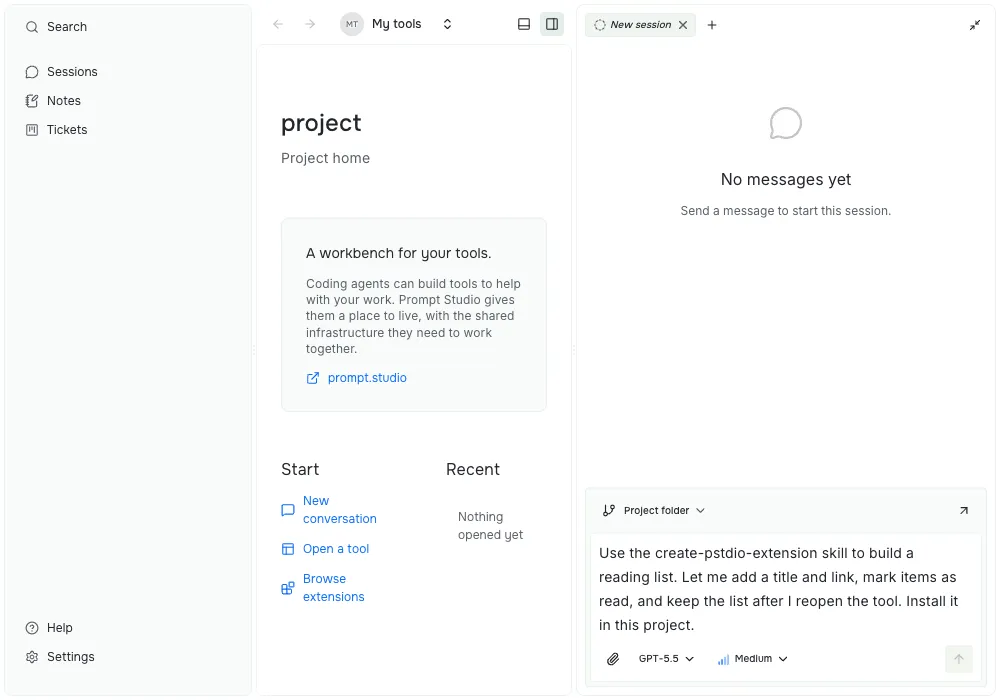
A request to build a reading-list tool in Prompt Studio. This screenshot shows the request, rather than a completed extension.
For example:
Build a reading-list tool for this project. Let me add a title and link, list items, and mark an item as read. Give it a page and CLI-ready commands. Show me that an item added from the terminal appears in the page, and that a change in the page appears in the list command.
The user supplies the need and judges the result. The agent writes and changes the tool. The developers maintain the shared platform those changes rely on. An extension author still has to connect its commands, views, and data; sharing a workbench does not make every tool interoperate automatically.
That division of work also needs clear limits. In today’s alpha, host-side extensions are trusted code running with your user account’s access; the extension API is not a security sandbox. The original essay’s browser-local Kaset model should not be read as a description of Prompt Studio’s runtime.
The idea I want to carry forward
I still like building software. But learning its deeper engineering should not be the price everyone pays before they can make one useful tool.
The spirit of the Kaset essay is user agency: let people shape their tools, while developers keep the foundations reliable. Prompt Studio gives that idea a place to live, with shared infrastructure and public interfaces for the tools people and agents build.
If you want to try that loop, open a project, set up an agent, and ask it to build one small tool.